A Step-by-Step Guide to Meta's Enhanced End-to-End Encrypted Backup Security
Introduction
Meta has recently strengthened the end-to-end encrypted backups for WhatsApp and Messenger by upgrading the underlying infrastructure. This guide walks you through the key components of their enhanced security system, explaining how the HSM-based Backup Key Vault works, how fleet keys are distributed over the air, and how users can verify the secure deployment of each new fleet. By following these steps, you’ll gain a comprehensive understanding of the new measures Meta has implemented to protect your backed-up message history.
What You Need
- Basic familiarity with end-to-end encryption concepts
- Access to Meta’s whitepaper, “Security of End-To-End Encrypted Backups” (optional but recommended)
- An internet connection to view published evidence on Meta’s engineering blog
- For verification: a device capable of running WhatsApp or Messenger (to see the encryption in action)
Step 1: Understanding the HSM-Based Backup Key Vault
Meta’s foundation for end-to-end encrypted backups is the HSM-based Backup Key Vault. This system allows you to protect your backed-up message history with a recovery code. The critical security feature is that this recovery code is stored in tamper-resistant hardware security modules (HSMs). These HSMs are designed so that neither Meta, cloud storage providers, nor any third party can access the code.
The vault itself is deployed as a geographically distributed fleet across multiple data centers. This distribution provides resilience through a majority-consensus replication mechanism. To better understand this component, read the relevant section in the whitepaper.
Step 2: Learning About Over-the-Air Fleet Key Distribution
For Messenger, Meta introduced a new way to distribute the public keys of HSM fleets without requiring an app update. Here are the details:
- Client verification: Before establishing a session, clients must validate the fleet’s public keys to confirm authenticity. In WhatsApp, these keys were previously hardcoded into the app.
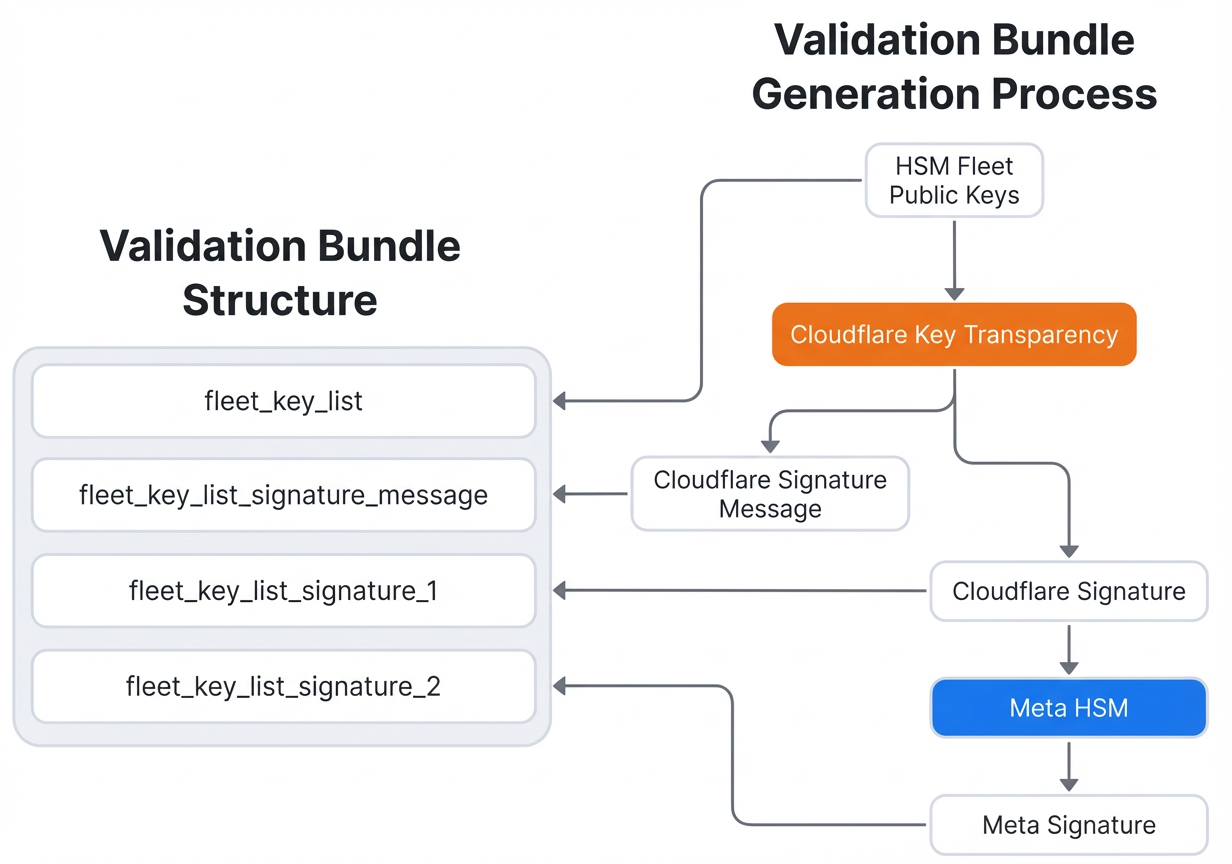
- Over-the-air mechanism: For Messenger, fleet public keys are now delivered as part of the HSM response. This delivery happens over the air via a validation bundle.
- Independent cryptographic proof: The validation bundle is signed by Cloudflare and counter-signed by Meta. Cloudflare also maintains an audit log of every validation bundle, providing an independent record.
For the full validation protocol, refer to the whitepaper’s security description.
Step 3: Verifying Transparency in Fleet Deployment
Meta commits to publishing evidence of the secure deployment of each new HSM fleet. This step is essential for demonstrating that the system operates as designed and that Meta cannot access your encrypted backups. Here’s how you can verify:
- Visit Meta’s engineering blog: Meta will publish evidence for each new fleet deployment (which occurs infrequently, typically every few years).
- Follow the audit steps: The whitepaper’s Audit section provides a step-by-step process to verify that a fleet is deployed securely.
- Check the blog post: Look for the latest announcement on this page—each new fleet will have a dedicated entry with cryptographic proof.
This transparency cements Meta’s leadership in secure encrypted backups, giving you confidence that your data remains private.
Tips
- Stay updated: Keep an eye on Meta’s engineering blog for future evidence publications. Since new fleet deployments are rare, this is a quick check every few years.
- Read the whitepaper: For a complete technical specification, download the whitepaper (originally linked in the blog post). It includes all the cryptographic details and audit instructions.
- Use passkeys: Late last year, Meta made it easier to end-to-end encrypt backups using passkeys. Combine this with the new infrastructure for optimal security.
- Understand the role of HSMs: The hardware security modules are the core of the protection. Remember that the recovery code never leaves the HSM in a readable form, ensuring even Meta cannot retrieve it.
Additional Resources
For the complete technical specification of the HSM-based Backup Key Vault, read the full whitepaper: “Security of End-To-End Encrypted Backups”.
Related Articles
- How to Defend Against Google AppSheet Phishing Attacks Targeting Facebook Accounts
- How to Design Accessible Session Timeouts for Users with Disabilities
- Russian GRU Hackers Hijack 18,000 Routers to Steal Microsoft Office Logins – Lumen Report
- 2025 Zero-Day Exploitation: Key Findings and Evolution
- Cybercriminals Exploit Amazon SES to Deliver Phishing Emails That Evade Security Filters—Urgent Alert
- Navigating the End of Ubuntu 16.04 LTS Security Updates: Upgrade or Subscribe to Extended Support
- Mastering the CopyFail Vulnerability: Understanding, Mitigating, and Securing Linux Systems Against CVE-2026-31431
- DDoS Protection Provider Huge Networks Unmasked as Origin of Attacks on Brazilian ISPs